
Flex Work Place
Passage Drive
Flex Work Place Passage Drive helps organizations achieve a VDI-like security posture on existing PCs, simply and at low cost. With OneDrive, user data is redirected to the cloud, protecting data and enhancing security while improving convenience through multi-device support, mobile use, and easy data sharing.
Overview
Flex Work Place Passage Drive lays the foundation for transforming locally held data into "corporate assets" by centralizing all work-related information into a company-managed cloud storage, developing the infrastructure for a cloud-based workplace facilitated by AI incorporation.
Data location and access are standardized, reinforcing organizational control over how work-related information is handled and helping reduce the risk of data leakage and internal misuse, including during employee transfers and offboarding. The aggregation of decentralized data enables conversion of existing information into refined organizational knowledge and improves productivity through integration with AI and analytics platforms. Furthermore, the PC's own resources are used to preserve a smooth operational feel for the user post-implementation.
-
Presentation Video
-
Demo Video
Benefits
-
01
Centralized Storage of User Work Data

By keeping user work data off local PCs and consolidating it in company-managed cloud storage, organizations can centralize data location, access permissions, and management responsibilities. This enables secure, device-independent data operations and allows unified policy-based data management regardless of location, device, or employment type.
-
02
Governance and Control of User Data

By placing all work data under organizational control, precise and immediate access management is ensured even when employees transfer roles or leave the company. Since data is never dispersed across local devices, the risk of data leakage and internal misconduct is significantly reduced, supporting transparent operations that meet audit and compliance requirements.
-
03
Knowledge Utilization of User Data (AI Integration)

Aggregating previously dispersed work data transforms information assets that were once dependent on individuals into knowledge that can be leveraged across the entire organization. This accelerates the reuse of deliverables and the transfer of know-how. Through integration with AI and analytics platforms, it further supports data-driven decision-making and continuous productivity improvement.
Key Features
and Capabilities
Flex Work Place Passage Drive disables writing to the local drive and redirects user folders to OneDrive, allowing users to work without leaving any data on the PC. User data is automatically stored in OneDrive, eliminating concerns about version management, data protection, or security.
-
Save User Data Automatically with OneDrive

User data is automatically redirected to OneDrive, so users can focus on their core work without having to worry about version management or preserving data during PC replacements. Data saved in OneDrive can be easily shared with team members. Even when members are in remote locations, they can collaborate efficiently without being constrained by time or place, dramatically accelerating business speed.
* Microsoft OneDrive and applicable Microsoft licenses are required and must be purchased separately.
-
Enhance Data-Leak Prevention for Mobile Use
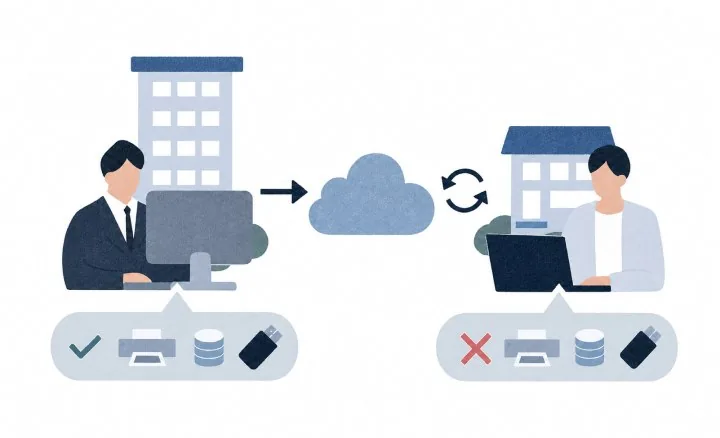
By redirecting user data storage to OneDrive and disabling local disk write access and visibility, Flex Work Place Passage Drive creates a secure PC environment for mobile use where no user data remains on the device.
How It Works
System Requirements
Client PC
- OS*1,2
- Microsoft Windows 11 (Version 21H2, Build 22000) x64
Microsoft Windows 11 (Version 22H2, Build 22621) x64
Microsoft Windows 11 (Version 23H2, Build 22631) x64
Microsoft Windows 11 (Version 24H2, Build 26100) x64
Microsoft Windows 11 (Version 25H2, Build 26200) x64 - OS Edition
- Pro
Enterprise*3 - Runtime
- .NET Framework 4.7.1 or above
- Update
- Applying all available updates (Quality Update) at the time of installation is recommended.
- CPU
- Compliant with Windows 11 CPU requirements
- Memory*4
- Compliant with Windows 11 memory requirements
- HDD
- 100 MB for the Passage Drive application
Free space equivalent to the designated size of the virtual disk drive*5
Free space equivalent to the profile data size of all users - Domain
- Active Directory domain is optional
For centralized management using management folders, joining the same domain as the server is required. - Application*6
- OneDrive client version 17.3.7301.0404 or above
Microsoft OneDrive service and applicable Microsoft licenses are required and must be obtained separately.
Installation and setup must be performed for each user.
*1: Tested under default OS settings. Customers must verify the impact of any configuration changes.
*2: Support information regarding Feature Update will be regularly posted on the product and support sites.
*3: Enterprise edition’s Long‑Term Servicing Channel is supported only while Microsoft provides the same version through the Semi‑Annual Enterprise Channel.
*4: Using a RAM disk requires memory sufficient for the designated drive size.
*5: Required only when using a virtual disk (volatile or non‑volatile).
*6: OneDrive for Business sync client (Groove.exe) cannot be used for syncing OneDrive.
Management Server Requirements
Using the management server *7 and Passage Drive Configurator *8 enables centralized management of all Passage Drive clients.
- OS
- Microsoft Windows Server 2016
Microsoft Windows Server 2019
Microsoft Windows Server 2022
Microsoft Windows Server 2025 - Runtime
- Microsoft .NET Framework 3.5
Microsoft .NET Framework 4.7.1 - CPU
- Microsoft .NET Framework 4.7.1 or above
- Memory
- Compliant with the OS’s memory requirements
- HDD*9
Configurator/Installer: 100 MB available space
Log File Size
• Standard log: 200 KB
• Standard log + debug log: 60 MB- Domain
- Must join the same Microsoft Active Directory domain as the Passage Drive clients under management.
*7: Refers to the server that creates the management folder; optional.
*8: Tool to centrally manage clients when installed on the management server.
*9: Required HDD size depends on number of clients, user accounts, uptime, and management groups.
*Specifications as of October 2026; subject to change without notice.
*Microsoft, Windows, Windows Server, and OneDrive are registered trademarks of Microsoft Corporation in the United States and other countries.
*Flex Work Place is a trademark or registered trademark of Yokogawa Rental & Lease Corporation.
*All other company, product, and service names mentioned are trademarks or registered trademarks of their respective owners.

Flex Work Place Passage redirects user data to company-managed file servers, protecting data and enhancing security. It delivers thin-client and VDI-equivalent security on your existing PCs, simply and at low cost.
Learn More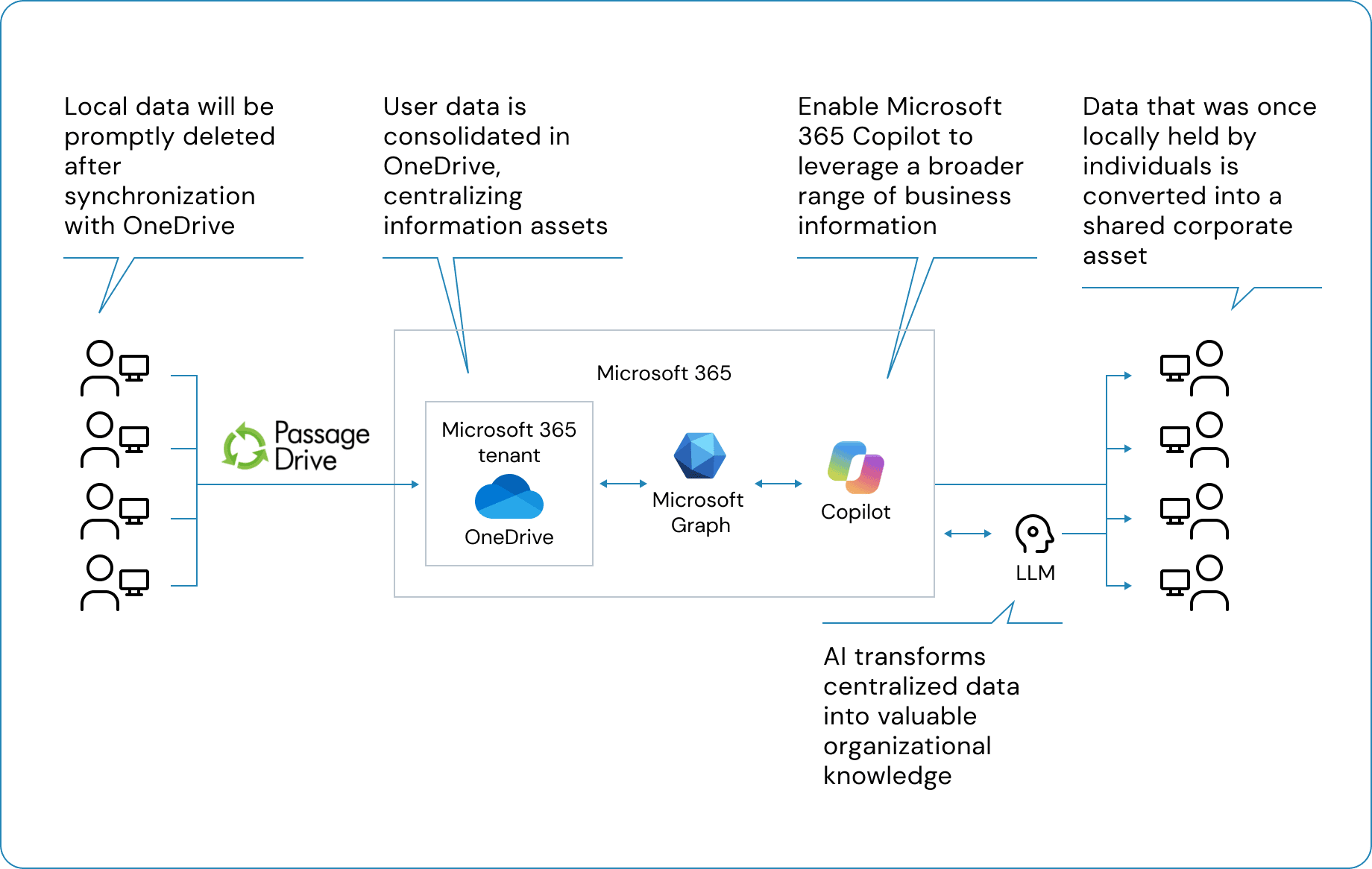
Contact Us About